How to Read a Local Show Preview Without Mistaking It for the Listing
A local show preview offers useful clues, but it is not the event listing. Learn what clips and captions reveal, and where to check practical details.
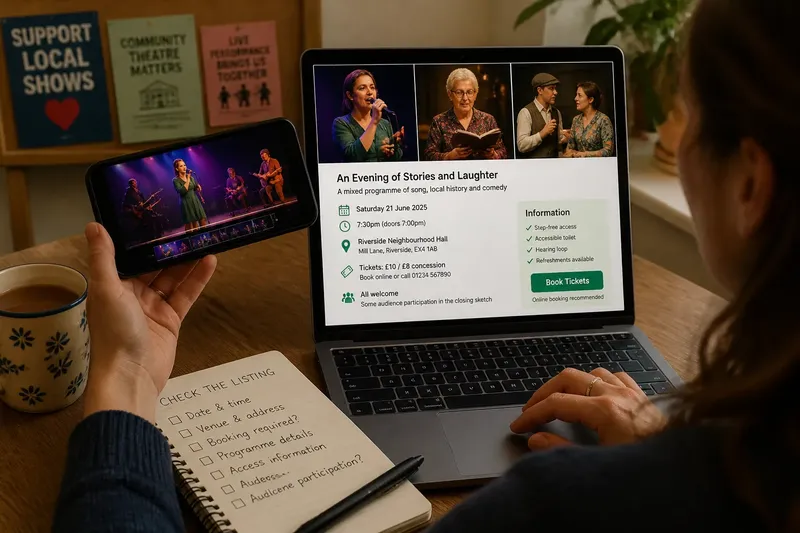
A local show preview can show you a performer, a visual style or a striking moment, but it cannot confirm the practical details of the event. Treat the clip as a promotional clue and check the written listing for what you need to plan a visit.
That distinction helps both audiences and promoters. A preview can spark interest, while clear accompanying information lets viewers judge whether the show suits them without mistaking an edited selection for a full account.
What can a local show preview actually tell you?
Look for details visible in the footage: costumes, instruments, the stage, the venue’s appearance and the performers featured. A clip of a singer at a microphone confirms that singing appears in the material shown; it does not establish how much of the programme is musical.
Captions can add context, but check what they state precisely. “Featuring local performers” identifies a broad feature, while “a relaxed evening” expresses an impression that may mean different things to different organisers. Neither tells you, by itself, whether the venue has step-free access or whether you need to book in advance.
Also note the date and source. A clip shared by the venue or organiser may be more relevant than an old repost, but even an official preview can refer to an earlier edition. If the event date, cast or venue has changed, the current listing should clarify that.
Why can a preview create the wrong expectation?
Editing selects and rearranges moments. A clip might linger on a comic scene, use lively music over quieter images or omit pauses between scenes. Those choices shape the impression without necessarily describing the event as a whole.
Promotional language can sharpen that impression. A caption such as “an evening of laughs” may describe one element rather than the entire programme. Read it as a claim about the material selected, then look for a fuller description before deciding what kind of event is being offered.
There is no need to demand that a preview represent every performer or mood. The useful question is whether the wording and images give a fair sense of the show’s broad identity, rather than implying that one highlight defines everything.
How can a promoter make the preview clearer?
Start with a plain description of the event, then choose footage that supports it. If the programme includes songs, spoken pieces and sketches, say that in the listing rather than expecting a few seconds of video to communicate the full mix.
Use captions to identify what viewers are seeing. “A moment from the opening song” is clearer than “the whole night”, and a short note can mention that the clip is a selection. Keep text readable on a phone, use an accurate event date, and check that any venue or booking details match the current listing.
Say you are promoting an invented neighbourhood hall show with an opening song, a local-history reading and a closing sketch. You select a brief image from each, caption them as moments from a mixed programme, and link to a listing that gives the venue, date and booking method. Viewers can then recognise the variety while using the listing—not the edit—to plan their visit.
What details should you check outside the clip?
Use the current event listing for information that a preview may omit or leave ambiguous:
- Check the event date and time; if they match your plans, continue, and if they are missing or unclear, ask the organiser before travelling.
- Check the venue name and address; if both are current, plan your route, and if the clip appears to show another venue, confirm the location with the organiser.
- Check whether booking is required; if the listing explains how to reserve, follow that method, and if it does not, contact the box office or organiser.
- Check the description of the programme; if it matches the kind of event you want, use it to set expectations, and if it conflicts with the preview, ask which information is current.
- Check access information relevant to your visit; if it answers your needs, plan accordingly, and if details are absent, contact the venue directly.
- Check whether audience participation is mentioned; if the listing describes it and you are comfortable, decide whether to attend, and if it is unclear, ask what participation involves.
These checks are more reliable than trying to infer arrangements from stage footage. If a particular access, seating or participation concern affects your plans, a direct question to the venue is more useful than a guess based on a short clip.
What questions do viewers ask about local show previews?
Does a preview need to show every performer?
No. A concise selection can introduce the event, while the current listing or programme provides fuller information about the performers. If a particular act matters to your decision, check whether it is named in the listing.
Can a preview tell me whether a show is suitable for children?
Not reliably from images alone, since a short edit may leave out material relevant to age suitability. Look for an age or content note in the listing, and ask the organiser if none is provided.
Should I trust an old clip shared online?
Use it as a visual clue, not confirmation that the current event has the same cast, venue or format. Check the date and details against the organiser’s current listing before making plans.
What should I do if the preview and listing disagree?
Ask the organiser which information applies to the event you plan to attend. The clip may be older, or the listing may need correction; neither source alone explains the mismatch.
What preview details are not worth the effort?
It is not worth squeezing every performer, venue detail and programme note into a rapid montage. Tiny captions and frantic edits can make the information harder to absorb. Put essential arrangements in the listing, where viewers can read them at their own pace.
A local show preview is most useful when you treat it as a selected introduction and use the listing to answer practical questions. When searching for a local show preview, check that the clip and event page refer to the same date and production; that small check can prevent a promising glimpse from sending you to the wrong details.